


Contents

| | | A.1 Free & client-side | Contents | |
 As of: May 15, 2007
|
1. General | |
| Name | OpenLayers |
| URL | |
| Home | http://www.openlayers.org |
| Documentation | http://trac.openlayers.org/wiki/Documentation |
| Download | http://www.openlayers.org/download |
| Live Demo | http://openlayers.org/gallery and http://www.openlayers.org/dev/examples |
| Current version | 2.3 (stable) |
| Last update | February 21, 2007 |
| License | BSD |
| Developed by | MetaCarta, USA |
| Short Description | OpenLayers is a Free (pure) JavaScript API used to integrate dynamic maps into any website. |
| 2. System | |
| Architecture | client-side |
| Programming language | JavaScript |
| Prerequisites | - |
| Supported browser | Mozilla 1.8; Firefox 1.0+; IE 6.0+; Safari 2.0+; Opera 9.0+; Netscape X.X |
| Where applicable, integration with other software | uses prototype and components of Rico |
| 3. Community | |
| Revision Administration | SVN (svn checkout http://svn.openlayers.org/trunk/openlayers/) |
| Mailing Lists (URL) | http://openlayers.org/mailman/listinfo |
| Developer ML | |
| Mails per month1 | 85 |
| Total number of active developers2 | 72 |
| User ML | |
| Mails per month1 | 197 |
| Total number of active users2 | 150 |
| Commercial support | MetaCarta, USA |
| 4. Documentation | |
| For installation/development/operation (suggestions, tutorials, URL) | no installation necessary (API); API reference; Quick Tutorial (good basic info, http://www.openlayers.org/QuickTutorial) |
| 5. Usability | |
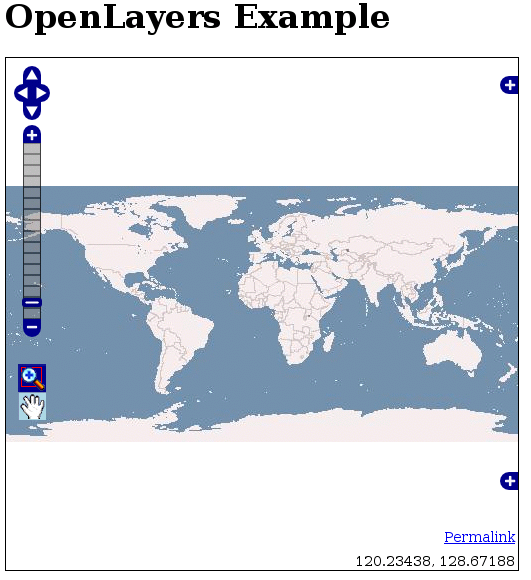
| All analysis is based on demo http://www.openlayers.org/dev/examples/controls.html | |
| Usability - General Impression | basically conforming to expectations; intuitive; plain GUI & clear; minimizable layer overview and overview map result in a very tidy user interface; remarkably quick reloading of tiles - easy navigation |
|
Main map | all elements/tools are placed on map |
| Overview map | can be minimized; dynamic zoom level; section can be moved with Drag&Drop or mouse click; missing centering of section after panning!; does not adjust to the style of the main map (displays only base layer) |
| Layer overview | minimizeable layer display; divided into base layers and overlays; can be de/activated with radio buttons and check boxes |
| Legend | - |
| Scale bar | simple scale indication possible (not included in demo) |
| Toolbar | not a conventional toolbar; very minimialistic; zoomBox and pan buttons only; missing zoomOut button irritating at first; active tool not discernible right away (bad color contrast); tool bar not really necessary |
| Zoom bar | halbtransparent in der Karte integriert |
| Pan navigation panel | above zoom bar |
| General zooming | switch between pan and zoom mode not necessary; max/min zoom level only discernible on zoom bar; missing in demo: reset map to default zoom value (in other examples through 'Worldmap' in a smaller zoom bar) |
| Zooming with double-click | yes |
| Zooming with mouse wheel | yes |
| Zooming with zoom box | yes (also by holding down Shift-key; colorful underlay of pulled-out area) |
| General panning | unhindered smooth panning with Drag&Drop; background reloading results in map movement without any (!) time delay |
| Zooming/panning with keyboard | yes |
| Tiling | yes |
| 6. Other Features | |
| All analysis is based on demo http://www.openlayers.org/dev/examples/controls.html | |
| Analysis function | - |
| Search function | - |
| Help function | - |
| Print function | - |
| 7. Notes | |
| • object-oriented JavaScript library (API) • very easy integration into own website • lite version (bundles selected classes into a js file, therefore integration with other web mapping applications is possible) • TileCache significantly advanced by OL • Integration of special layers is possible (GoogleMaps, ka-map, Yahoo, Virtual Earth and many more); Map24 support for development | |
| 8. Screenshot | |
| of analyzed demo | |
| |
As of: May 15, 2007
|
1. General | |
| Name | WMS Mapper |
| URL | |
| Home | http://wms-map.sourceforge.net |
| Documentation | See Home |
| Download | See Home |
| Live Demo | See Home |
| Current verion | 0.03 |
| Last update | k. A. |
| License | Academic Free License (AFL), Artistic License |
| Developed by | k. A. |
| Short Description | WMS Mapper is a lean JavaScript library for the integration of WMS services, with simple zoom and pan functionalities. |
| 2. System | |
| Architecture | client-side |
| Programming language | JavaScript |
| Prerequisites | - |
| Supported browser | k. A. |
| Where applicable, integration with other software | Prototype |
| 3. Community | |
| Revision Administration | - |
| Mailing Lists (URL) | - |
| Developer ML | - |
| Mails per month1 | |
| Total number of active developers2 | |
| User ML | - |
| Mails per month1 | |
| Total number of active users2 | |
| commercial support | k. A. |
| 4. Documentation | |
| For installation/development/application (suggestions, tutorials, URL) | no installation required; no documentation - only brief introductory example on start page |
| 5. Usability | |
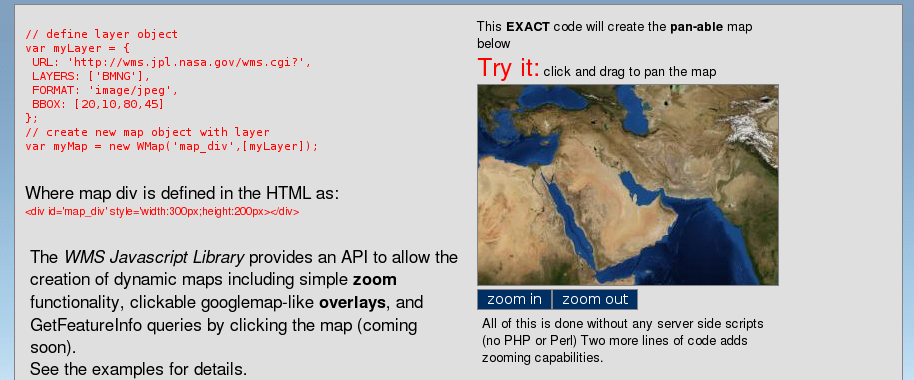
| All analysis is based on demo on start page | |
| Usability - General Impression | plain, only two zoom buttons, intuitive navigation, missing zoom depth orientation and other interaction possibilities |
|
Main map | plain, well integrated into website |
| Overview map | - |
| Layer overview | - |
| Legend | - |
| Scale bar | - |
| Toolbar | not like conventional toolbars; very minimalistic; only ZoomIn and ZoomOut button; click on button starts zoom process - therefore no extra button actions required |
| Zoom bar | - |
| Pan navigation panel | - |
| General zooming | not required to switch between pan and zoom mode; maz/min zoom level not discernible; no ability to set map to default zoom value; zooming only with buttons; zooming to a specific location not possible |
| Zooming with double-click | - |
| Zooming with mousewheel | - |
| Zooming with zoom box | - |
| General panning | unhindered smooth panning with Drag&Drop; background loading of map causes almost simultaneous map movement; with large panning steps the pre-loaded tiles are not sufficient |
| Zooming/panning with keyboard | - |
| Tiling | yes |
| 6. Other Features | |
| All analysis is based on demo on start page | |
| Analysis function | - |
| Search function | - |
| Help function | - |
| Print function | - |
| 7. Notes | |
| • JavaScript API • easy to integrate into websites • GetFeatureInfo to follow shortly | |
| 8. Screenshot | |
| |
© June 1, 2007 |
Emanuel Schütze |
some rights reserved.
This work is licensed under the Creative Commons License
Attribution-ShareAlike 2.0 Germany.
| | | A.1 Free & client-side | Contents | |